Ok so here’s the gist, bullet journaling is like a combination of every list, calendar, task, reminder that grows each day and helps you stay organized. Basically every post it note you have ever written. I feel in love with the concept when I was searching Pinterest for planners. I attached the video from http://www.bulletjournal.com that really gives a great visual on the concept. I love tools for organization and when I was a kid back to school shopping was my favorite! New notebooks and pens are the best.
If you research bullet journaling you will see that many examples are so visually stimulating with beautiful penmanship and creative and different ways to organize your life. With all the information I needed I headed over to my local book store to get the LEUCHTTRUM journal with the dots. My bullet journaling lasted for about 3 months. I loved it my only problem was that I left my cute little notebook everywhere. I work retail and I would find my “handy dandy notebook” everywhere. And I thought about it, I mean I tell customers all the time to go digital so I got to thinking…
So I took some time to come up with a way to make the concept accessible in a digital and cross platform way. That’s when I realized the answer was one of my favorite and free Office programs, OneNote.

So I created a template that would work with all my devices, and sync from one to the other! If you haven’t used OneNote then let me introduce you to the best program ever! (I work for Microsoft by the way) and in all honesty, when my co workers told me that “It’s the only reason I passed College” I was like … eehhh… doubt it. Oh My Goodness was I wrong! Its awesome. Its like a binder/notebook/ everything from you put in that Jansport backpack of yours in one program on all your devices.
So open OneNote, its probably already on your device. Try it! check that start menu. Ok, ok I know you found it. lets do this!
Here’s were you may need to complete a little setup. Don’t worry I did the dirty work for you. I created an 2 things, a blank OneNote Bullet Journal and an excel sheet saved in it for the future. My other favorite program, Excel. Don’t worry all you will ever need it for is a copy/paste from it as you move from year to year.
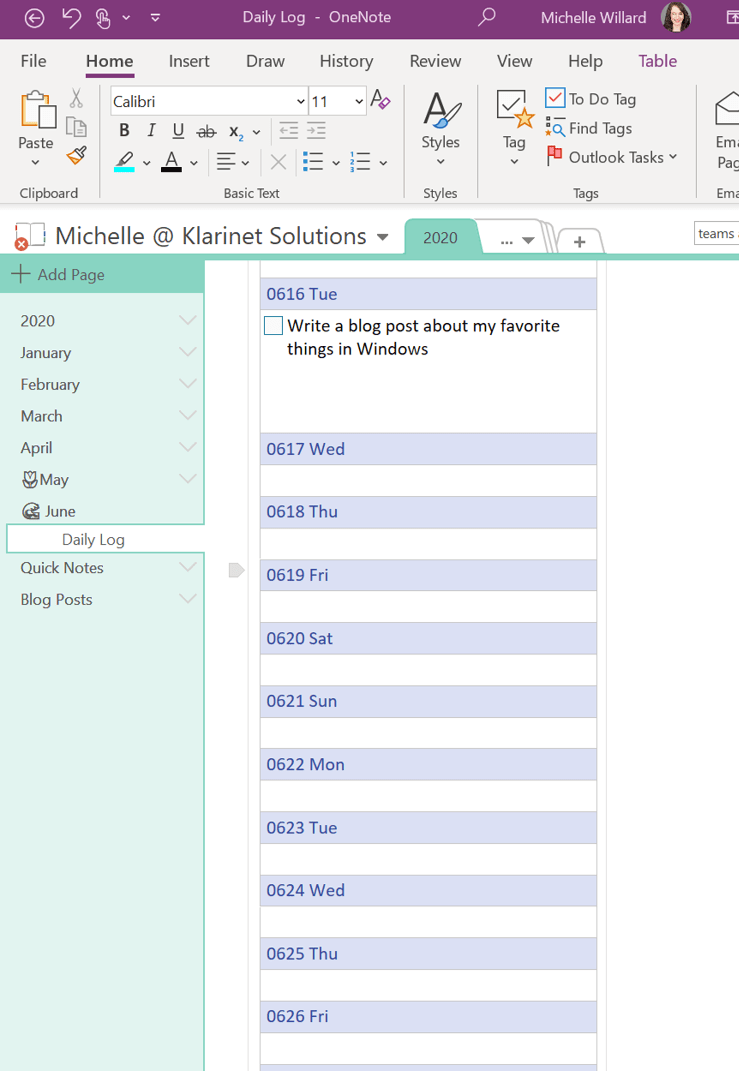
I took the below screen shots to show how I use my digital Bullet Journal day to day. I dock my ongoing list of tasks, reminders, etc to my desktop so I can use other programs but my tasks stay top of mind, no more forgetting to call mom. And for when I’m on the go I have the OneNote app on my phone.


Click Here to Download from my OneDrive – since the file type is not supported by word press.
Ok first post done. Let’s see if anyone ever sees this.
Cheers!
 Michelle Willard